2006/07/13
A simple color picker input on XUL
Today I'll show how to develop a binding that renders a simple color picker widget. This isn't something most people will need, but I did, so maybe you will too. This post also serves as a nice little example of the power and flexibility of XBL bindings.
I require a color picker input for an extension I'm currently working on. This extension requires that most interface elements to be customizable, styles included. This made having a color picker a mandatory requirement. So I started my quest for the information I'm about to give you. For free ;).
As usual, I thought at first that this was going to be real easy. I had some vague recollection of a XUL element that had this very purpose. So I looked it up and found it: the XUL colorpicker element. But alas, this was far from what I needed. This element is a little to low-level, if you look at it from the bright side. If you show the element as a button, you will see that this button opens as little popup that lets the user pick a color from a small grid. The problem is that clicking on any color on the grid does nothing. No color is picked. The grid remains open. It's just not fully functional. Or maybe I forgot to set the "pleasework" attribute to "true". Here's a screenshot of the element after being clicked:
Well, not really. It kind of gave me the idea of what I needed to do to solve this problem: wrap the partly functional XUL element with a binding that gave me what I really needed. The question was, what did I need? I wanted something simple, so a functional colorpicker element might do. But then I thought that I also wanted something a little more flexible, that would allow more advanced users to pick any color they wanted. I had to find a compromise between complexity and functionality, and in the end I settled with this:
Since my color input required to behave as a single unit (I wanted a single "value" attribute that could be set from a template or read from a script), an XBL binding was in order. Here's the code for the binding and a little explanation about it:
The content of the binding has two simple XUL elements: a textbox and a colorpicker. They both inherit the value attribute from the bound element, and they both implement methods that will update the "value" property when they are changed. The "onselect" handler in the colorpicker is worthy of notice, because that's one of the changes required to add proper functionality to the element. When a color is picked from the grid, this event is fired, but the "color" attribute is not changed, as it should. The "mPicker.color" property is the one that contains the newly selected color, so that's the one you want to use to set the value. The call of the "initialize" method on the picker is the other thing you need to keep in mind. For some reason the element is not properly initialized on the binding.
This binding is "template-friendly", as described on my Attributes and properties post. I also added a little validation on the constructor so that elements inside templates don't throw CSS errors. It's not a big deal, but the cleaner the better.
I've tested this input extensively and I'm very pleased with the end result. Hopefully this will prove to be useful for you as well.
I require a color picker input for an extension I'm currently working on. This extension requires that most interface elements to be customizable, styles included. This made having a color picker a mandatory requirement. So I started my quest for the information I'm about to give you. For free ;).
As usual, I thought at first that this was going to be real easy. I had some vague recollection of a XUL element that had this very purpose. So I looked it up and found it: the XUL colorpicker element. But alas, this was far from what I needed. This element is a little to low-level, if you look at it from the bright side. If you show the element as a button, you will see that this button opens as little popup that lets the user pick a color from a small grid. The problem is that clicking on any color on the grid does nothing. No color is picked. The grid remains open. It's just not fully functional. Or maybe I forgot to set the "pleasework" attribute to "true". Here's a screenshot of the element after being clicked:
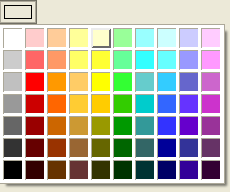
Well, not really. It kind of gave me the idea of what I needed to do to solve this problem: wrap the partly functional XUL element with a binding that gave me what I really needed. The question was, what did I need? I wanted something simple, so a functional colorpicker element might do. But then I thought that I also wanted something a little more flexible, that would allow more advanced users to pick any color they wanted. I had to find a compromise between complexity and functionality, and in the end I settled with this:

Since my color input required to behave as a single unit (I wanted a single "value" attribute that could be set from a template or read from a script), an XBL binding was in order. Here's the code for the binding and a little explanation about it:
<binding id="color-input">The color input would then be used in my XUL file as follows:
<content>
<xul:hbox>
<xul:textbox anonid="color-textbox" inherits="value"
onchange="this.parentNode.parentNode.value = this.value; return true;" />
<xul:colorpicker anonid="color-picker" type="button" inherits="color=value"
onselect="this.parentNode.parentNode.value = this.mPicker.color; return true;" />
</xul:hbox>
</content>
<implementation>
<constructor><![CDATA[
var picker =
document.getAnonymousElementByAttribute(this, "anonid", "color-picker");
var color = this.getAttribute("value");
picker.initialize();
/* avoid problems with templates. */
if (color && (color.search("rdf:") < 0)) {
this.value = color;
} else {
this.value = "#000000";
}
]]></constructor>
<property name="value"
onget="return this.getAttribute('value');">
<setter><![CDATA[
var picker =
document.getAnonymousElementByAttribute(this, "anonid", "color-picker");
var textbox =
document.getAnonymousElementByAttribute(this, "anonid", "color-textbox");
picker.color = val;
textbox.value = val;
this.setAttribute("value", val);
]]></setter>
</property>
</implementation>
<handlers>
<handler event="DOMAttrModified"><![CDATA[
if(event.attrName == "value") {
this.value = event.newValue;
}
]]></handler>
</handlers>
</binding>
<colorinput value="black" />Having the proper CSS binding set for the colorinput tag, obviously.
The content of the binding has two simple XUL elements: a textbox and a colorpicker. They both inherit the value attribute from the bound element, and they both implement methods that will update the "value" property when they are changed. The "onselect" handler in the colorpicker is worthy of notice, because that's one of the changes required to add proper functionality to the element. When a color is picked from the grid, this event is fired, but the "color" attribute is not changed, as it should. The "mPicker.color" property is the one that contains the newly selected color, so that's the one you want to use to set the value. The call of the "initialize" method on the picker is the other thing you need to keep in mind. For some reason the element is not properly initialized on the binding.
This binding is "template-friendly", as described on my Attributes and properties post. I also added a little validation on the constructor so that elements inside templates don't throw CSS errors. It's not a big deal, but the cleaner the better.
I've tested this input extensively and I'm very pleased with the end result. Hopefully this will prove to be useful for you as well.
Labels: color, colorpicker, colorzilla, css, nvu, style, xbl, xul

